/eh/2025-01-08/173633966714069467/picture.png)

/eh/2024-12-24/173503345348979036/Favorite-Icon.png)
/eh/2025-07-08/1751962110204480194/picture.png)
/eh/2025-06-21/1750485478958537574/countryInfoIcon.png)
/eh/2025-06-21/1750485741321434291/Hi-Sign-in-My-Nihao.png)
/eh/2025-06-21/1750485837193896318/cart.png)
/eh/2025-06-21/1750485968202533847/cart.png)
/eh/2025-04-17/1744862476612819675/hot-img.png)
/eh/2025-11-07/1762504524550532584/header-icon.jpg)
/eh/2025-07-07/1751875582852206790/header-icon.png)
/eh/2025-07-07/1751875587886277738/header-icon.png)

Best in 7 days


Shopping security
This is our NEWEST invention for our customers wanting to use PTT apps on cell phones and tablets.
Most cell phones and tablets do not support any kinds of external Push-to-Talk (PTT) function on their accessory plugs, so users either have to use the device screen or Bluetooth to make the PTT work.
Sometimes it's not easy to push a PTT on the device screen, and Bluetooth can be inconvenient since it needs pairing, battery charging, etc.
The SE-01 PTT solves this problem by having the computer software inside!
(like phone calling, music playing, photo taking, etc.)
The SE-01 PTT button activates computer software that communicates to the phone or tablet and activates the PTT of the PoC App directly.
The SE-01 PTT works just like a normal PTT - push to talk and release to listen.
There has no battery to charge with and the SE-01 does not draw any power from your phone or tablet
(the SE-01 has a small disposable battery which you can easily change, but it will last for 1 to 2 years so it is very inexpensive to operate.)
Using the SE-01 is super easy!
Select 'External PTT' in your PoC App
(not every PTT App supports external PTT, so please check first.)
Plug in the SE-01, and simply press the PTT to start talking.
There has nothing to pair, nothing to charge. Couldn't be much easier!


Depending on the Android device, you may need to disable Google Play Music under applications to prevent the headset hook from bringing up music.
If you're using one of the Zello recommended accessories that function as a push-to-talk device, log into your management console and go to Settings > Android > "Enable Use specialized wired PTT speaker-mic or headset" and save.
1. Connect the accessory to your mobile device
2. Open Zello "Options" > "Push-to-talk button"
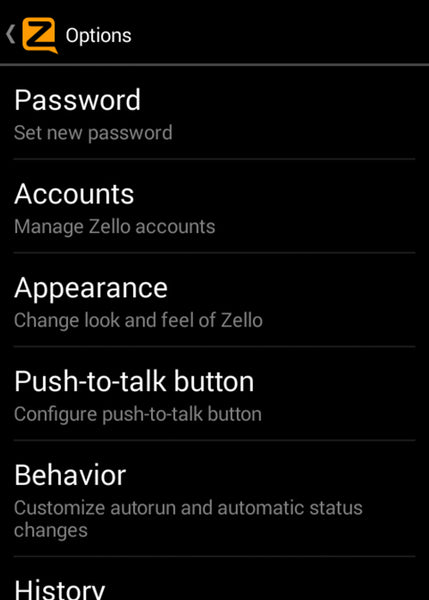
3. Select "Add Button" on the top right. You'll get a prompt asking you to press the desired button and it will be added as a "Headset hook".


4. Make sure the button is set to "Toggle mode" and that "Handle headset button when in the background" is enabled. Even though it's set to toggle mode, the accessory will work as a push-to-talk mode if it's listed as push-to-talk from the website. If you're using a device not listed, it will most likely only work as Toggle mode.

Although Zello does have the option to map a headset hook from an Apple headset, it is not often reliable. Zello does not have the control to maintain the headset hook for PTT control, so the headset button will may sometimes trigger music. To prevent this from happening, make sure you don't have a music app in the background while using Zello.
Connect your headset to your iPhone and then follow these steps:
1. Set push to talk button "Action" to "Toggle".
(Zello menu>Options>Push To Talk button>Action>Toggle).
2. Make sure you have enabled "Headset/remote control" enabled.

3. Go to Audio settings and make sure you have "Mix with other audio" turned Off
(Zello menu > Options > Audio > Mix with other audio > Off ).

Ships within 48 hours · Estimated delivery Oct 3 - Oct 8
US$40
Get nowSign up to your membership to get coupons up to
15%
Get nowOpportunity to enjoy order discount up to 15% off
Top-Converting Item to Boost Your Average Order